A Debatably Brief Overview of Homebrew

I want to make Nintendo games.

Let’s face it, we’ve all thought that at one point or another. Usually it doesn’t go any further than wishful thinking, though. Sure, some of us might doodle concept art or gameplay ideas in a notebook, a few might even learn to program, but even for those with all of the skills there’s another, more tangible hurdle: the tools. Game development isn’t free and procuring a software development kit (SDK or devkit for short) is often a costly proposition. For those of you not familiar with the game development process, a devkit is a collection of specialized software and hardware used to make and test games. They’re quite expensive: the Wii’s devkit cost around $5000, which at the time was rather cheap compared to the XBox 360’s and PS3’s $20,000 price tag. Now, those of you who are used to making do with free software—like me—are probably thinking, “do I really need all of those fancy tools?”

No.

Homebrew is the process of making software for a system without the original development kit or system distributor’s blessing (more commonly known as a “license”). The term originated among beer aficionados for beer brewed by an individual instead of a commercial brewing house, but now is used in many hobbies—including video games—to refer to unofficial/amateur produced content. Homebrewering shouldn’t be confused with modding or ROM hacking: homebrewing is concerned with making new content for a system, while modding and ROM hacking only intend to change or manipulate an existing game (sometimes to the point where it’s arguably a different game made from the parts of the original).

Homebrew is the process of making software for a system without the original development kit…

What’s Homebrew Like?

Homebrew provides a surprisingly diverse selection of content. There’s homebrew for almost all Nintendo systems, though the type of content varies greatly from system to system. Older systems mostly focus on games, while newer ones–from about the Wii onward–have homebrew for everything from games to system utilities. Let’s take a quick look at some examples.

Games
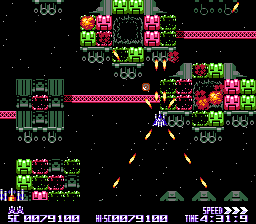
Blade Buster

Just as “all toasters toast toast [sic]” Nintendo homebrewers homebrew games…duh. Sadly, most of the homebrew games I found in my research are simple, forgettable diversions much like the flash games of the early days of the internet. It’s not that surprising, considering game development on any level is an intricate and time consumptive process. That isn’t to say that all homebrewers lack diligence and ambition. There are still many quality original titles. Notice that I said original titles; a large number of homebrew game projects are simply ports, usually of games whose creators have released the source code to the general public. In fact, the Wii alone has ports of P.C. classics such as Tyrian, Quake, and Jazz Jackrabbit.


N-Warp ScreenshotI’m not going to try to enumerate every homebrew project released for a Nintendo system, but for the sake of being thorough, there are some that warrant mention. First up is Blade Buster, a Famicom shoot-em-up notable for its screen filling boss sprites (on an 8-bit console mind you), an insane number of sprites on the screen at a time, and unique time-attack styled gameplay. Next for the Super Nintendo is N-Warp Daisakusen, a game that allows eight—yes, eight—players to compete in a free-for-all brawl. Lastly, I want to mention a puzzle game for the DS named Negative Space which has the player drawing paths to guide two opposite colored blobs to their respective goal flags. The catch? They can only travel through the other’s color, meaning every path you draw for one is an obstacle to the other.

Negative Space
This game is also available as a free download on Android.

Emulators

After games, the most common type of homebrew is emulators. I’m not exactly sure why when emulators are already so prolific on P.C. Maybe people make them because they like the challenge of getting an emulator to function on the constraints of a game console. Maybe it’s to prove that more fully featured emulation is possible on Nintendo systems. Maybe people just think it’s funny to play Playstation games on their Wii. Whatever the reason, most of Nintendo’s modern systems have a multitude of homebrewed emulators available on them.

WiiSX
I can’t be the only one who thinks this is hilarious.

Obviously, many of the homebrewed emulators available online for Nintendo consoles are for older Nintendo systems. As I alluded to in the previous paragraph, however, the homebrewed emulator scene isn’t exclusively concerned with Nintendo systems. On the just Wii alone there are emulators for Sega Genesis/Mega-Drive, Sega Saturn, Playstation 1, CalecoVision, Commodore 64, Atari Lynx, and many, many, many, many, many more. Also, there’s a Super Nintendo emulator that runs on the original 3DS (I knew it!).

Whatever the reason, most of Nintendo’s modern systems have a multitude of homebrewed emulators available on them.

Miscellaneous Software

Not all homebrew projects are game related. Some are just the sort of software you’d find on any computer: music players, web browsers, etc. One such program of note is an art program called Colors! Which was originally developed as homebrew for the DS but has since gotten an official release on multiple systems, including the 3DS eshop. Then there’s software that changes system behaviors. For example, the 3DS has an application that removes the cap on the number of play coins a player can receive in a day. More impressive is a Wii hack that let’s the user change the region of the console—y’know, to play region locked games.

Linux

Where there’s hardware, there’s Linux. Much like the speed of light or the certainty of death and taxes, it’s one of the constants of our universe. Seriously, any system that’s powerful enough to run Linux sooner or later will. There’s Linux for the GameCube, Linux on the 3DS, Linux for the Wii, a distro is in development for the N64, there’s a version for the DS; heck, even the GameBoy Advance has…Unix?

…Wait, what?

GameBoy Advance Unix
What?

Any system that’s powerful enough to run Linux sooner or later will.

Cool! Let me try!

For those of you who don’t know, I happen to be a programmer, so when I write an article that gives me the opportunity to talk about programming, I’m going to talk about programming. If you think programming is some kind of voodoo (which it isn’t: it’s sorcery), you may want to skip this part.

Still here? Great! Believe it or not, if you’re already comfortable with programming it’s almost as simple as picking the system you want to develop for and a few Google searches. While homebrewing isn’t exactly the go-to past-time among bored nerds, there are several online guides and communities dedicated to the craft: forums, YouTube videos, blogs, and wikis galore! Heck, there’s an entire free book on WikiBooks about Super Nintendo programming.

Even though you’re not going to be using The Man’s toolkit, you can’t exactly make a game with just your imagination and wishful thinking (trust me, I’ve tried). You will need software to compile the code you write and, if you’re developing for one of Nintendo’s more recent systems, an API library to interface with the system (getting controller input and such). You’ll also want an emulator. Fortunately, all of these tools can be easily acquired on the internet for free.

 There are several online guides and communities dedicated to the craft: forums, YouTube videos, blogs, and wikis galore!

As for the coding itself, it’s mostly the same as regular programming. For example, I—out of curiosity—browsed through a tutorial on GameBoy Advance homebrewing and was quite relieved (and just a little surprised) to find that the code was hardly distinguishable from any other program written in C. There are certainly nuances to keep in mind—like in the case of the GBA, some memory addresses are reserved for the screen’s RGB values, tracking whether buttons are pressed, and so on. You may also need to go without some modern conveniences (hope you like compiling your code from command-line!). But by-and-large, anyone who’s sufficiently experienced with C and/or C++ should be fine.

Unless you’re developing for an 8 or 16-bit system. In that case I hope you really like 65c816 Assembly!


We Haven’t Even Touched the Red Pill

Instead of starting on a proper summation, I’d like to cover my backside real quick and stress that despite this being the longest article I’ve written for Two Button Crew to date, I have only given the barest of overviews of the subject. I encourage you to look further into this, either as someone interested in finding new games to play or someone hoping to make such games. More over, there’s a lot I omitted for length, like how some retail games have been pulled from store shelves because of homebrewers.

Having said all that, it’s a shame homebrew isn’t more popular. I understand why, though: if someone’s going to go to all the trouble to make a game, why make it for a dead system? And if it’s for a modern system, why make a game that they can’t license and sell? But, hey, who knows? Many Nintendo fans have grown up and started making games of their own. As time goes on and more fans get old enough to take an interest in game development, maybe some of them will try to make a few for the systems they played on as kids. Wouldn’t that be something, a flood of new old games?


About the Author:

Glen is a lifelong Nintendo fan whose love of video games has inspired him to pursue a career in computer programming; so much so that he is now studying to get a masters in computer science. He doesn’t understand that the average person isn’t interested in programming and won’t shut up about how awesome it is.


The Streamlined Turnabout

Note From the Author: The game discussed in this article, Phoenix Wright: Ace Attorney – Duel Destinies, has been rated M for Mature (ages 17+) by the ESRB for the following: violence, blood, suggestive themes, and language. That said, this article focuses only on the game’s mechanics and should be appropriate for all audiences. Please use care and caution when deciding what games are right for you and your family.

I typically don’t play story-heavy games during the school year: they take a long time to beat and all of that pesky suspense and intrigue makes them hard to pull myself away from. So when summer rolled around earlier this year, I decided it was high time I got around to playing a game I’ve been meaning to tackle ever since it came out way back in 2013, Ace Attorney: Dual Destinies.

After slogging through other plot-driven games in the past solely out of pride (I beat games, not the other way around), I figured that I—a busy adult with things to do—simply had grown out of those types of games. As such, I went in to Dual Destinies with fairly low expectations.

AA5_Holdit

It didn’t take me long to remember one crucial piece of information: I like the Ace Attorney series…a lot. This game is no different. While not the strongest entry in the franchise (clumsy writing in places, too much hand-holding, and not nearly enough Trucy Wright), Dual Destinies still managed to impress me, especially where I least expected it: the game mechanics.

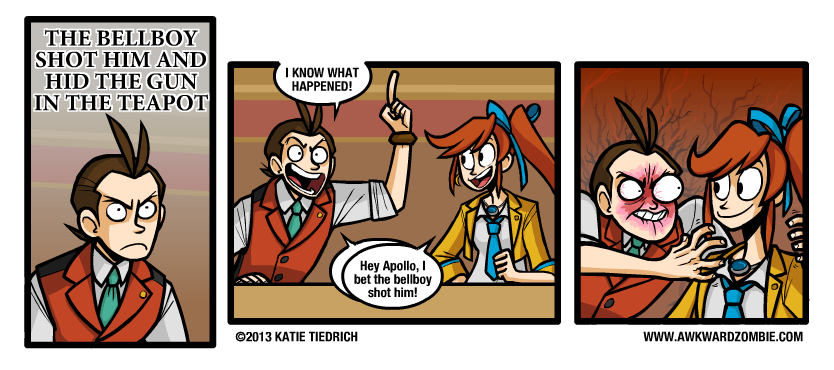
Awkward Zombie Trying My Patience Truncated
The game does have an annoying habit of spoon-feeding the player.

The Ace Attorney series is no stranger to introducing new gameplay mechanics and gimmicks, but until Dual Destinies, I honestly can’t think of a game in the franchise that took existing elements and trimmed the fat. Overall, the game has the best pacing and flow of the entire series, which is why I think it’s the perfect candidate for a case study on how to streamline gameplay mechanics. Court is now in session!

Dual Destinies managed to impress me, especially where I least expected it: the game mechanics.

Opening Statement: The Investigation Phase

Cases in the Ace Attorney franchise are generally split into two distinct parts: investigations and court sessions. For anyone not familiar with the franchise, defense attorneys in the Ace Attorney universe are two parts lawyer and one part private investigator. They question witnesses, search for clues, and sneak evidence out of crime scenes when the cops aren’t looking, all to prove their client’s innocence. This portion of the job is represented in gameplay with what’s known as the investigation phase and plays much like a traditional adventure game in the vein of the Monkey Island series or Princess Tomato in the Salad Kingdom. These segments of the game are often the longest, and fittingly, most of the trimming the game does is in these portions.

Defense attorneys in the Ace Attorney universe are two parts lawyer and one part private investigator.

Exhibit A: The Search Command

Like many adventure games, players in Ace Attorney games must search the environment to find items they can use, in this case evidence to prove their client’s innocence. The examine command brings up a cursor that the player can then use to click on objects in the environment to investigate them. Now, not everything the player sees in an area is going to be evidence (Phoenix’s office plant, Mr. Charlie, for instance), and when clicked these objects, instead of advancing the plot, will just trigger some flavor text wherein the protagonist and his plucky sidekick humorously palaver on about the object in question (#TeamStepLadder).

Screenshot of both screens of Phoenix Wright: Ace Attorney.
A typical investigation from the first game.

Now, in games prior to Dual Destinies, every location was searchable, even if there wasn’t any evidence there (I’m looking at you Wright & CO. Law Offices). This meant players were expected to search every area. Just because a murder occurred in, say, a public park doesn’t mean the player won’t end up searching an abandoned doctors office for clues on the whereabouts of the true killer’s lost shoes.

In games prior to Dual Destinies, every location was searchable, even if there wasn’t any evidence there.

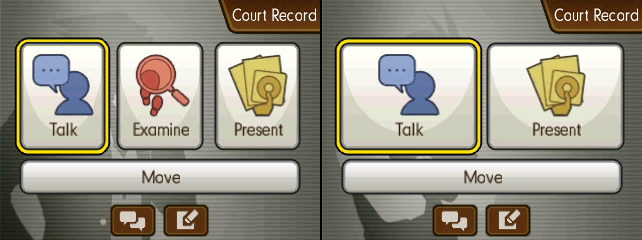
Examine UI
While conventional wisdom looks down on limiting what the player can do, sometimes it can improve the overall experience.
Cursor Comparison
The search cursor before and after examining an object.

Dual Destinies improves on this feature in several ways. First, the game limits use of the examine command strictly to crime scenes. This means that there’s only ever one searchable location for the player to worry about at a time, unlike previous games that let the player switch between searching multiple areas, each of which could change depending on event flags. More over, the game now has the courtesy to inform players when they’ve found everything they need, which too often wasn’t clear in previous titles. Lastly, Dual Destinies introduced the ever so subtle—but oh-so-useful—addition of having the cursor take the shape of a check mark if the object being highlighted by the player has already been investigated. Considering that many of the conversations triggered when clicking on something could be quite long, even with fast forwarding, this U.I. feature is something longtime fans can appreciate.

And to top it all of, despite the newly imposed restrictions there’s still plenty of that sweet, sweet flavor text.

Exhibit B: The Travel Menu

Locations in the Ace Attorney series are normally static, disconnected, one-screen “rooms” that the player travels between via selection from a menu. It’s about as utilitarian as it gets, and yet Dual Destinies still managed to smooth out the rough edges. See, for whatever reason, previous games in the franchise had a four option limit on the travel menu, meaning the player could only travel to four other locations from any given area. The way the developers got around this—quite frankly arbitrary—limit was to have each area have its own list of destinations. So, for example, if the player wanted to go from the detention center to the crime scene, they may have to travel to back to Wright’s Office, then to the front door of the building the body was found in, and then to the actual crime scene.

Of course, a sleek, afigimatiko-dynamic game like Dual Destinies isn’t about to put the player through all that for something as simple as getting from point A to point B! Enter the magic that is “scrolling”! With this space-aged technique, players now have the uncanny ability to pick any location from anywhere in the game simply by “scrolling” between options! (Restrictions may apply in accordance to plot demands.)

Ace Attorney 5 - Travel UI
The Ace Attorney series is known for its inclusion of supernatural elements; scrolling was only a matter of time.

Exhibit C: The Notebook

Anyone who’s played an old-school adventure game can tell you that the worst thing that’s guaranteed to happen to the player at some point is getting stuck without any clear directions. This is why many modern games of all genres keep an objectives list or provide a character who the player can ask for advice at any time. Unfortunately, until Dual Destinies the Ace Attorney games fell into the old adventure game trap of not always giving the player clear directions on what to do next. To make matters worse, N.P.C.s had an annoying tendency to just up and disappear until the player triggered the right event flag. This led to the player constantly going back and forth after every event to see which N.P.C.s had returned to their post and who had new dialog options.

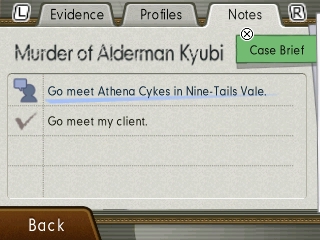
Ace Attorney 5 - Notebook
Oh right, I was investigating a murder! I should really get back to that…

Dual Destinies introduced an extra section to the court record (basically the player’s inventory screen) for notes—which in this case is more of a checklist than a place for the player to jot down information. Any time the player isn’t sure what to do next, they can just open the court record, hit the notes tab, and be on their way. Admittedly, Dual Destinies’ plot is structured in such a way that the player rarely needs extra input, especially once you factor in the previously listed enhancements, but the handful of times I did need it, I greatly appreciated the fact that I could just hit a few buttons and continue the game instead of wandering around in circles for ten minutes.

Any time the player isn’t sure what to do next, they can just open the court record, hit the notebook tab, and be on their way.

Closing Thoughts

What I hope to get across is how seemingly small changes eventually add up. Small U.I. improvements can help better communicate information to the player, which leads to less time spent on tasks that slow progression. Moreover, limiting when a player can perform certain actions—like investigating their environment—can keep them from getting side-tracked or lost. In Dual Destinies’ case, the end result is the first Ace Attorney game that didn’t have me at a complete loss for what to do next at any point. As I mentioned in the beginning of this article, it’s not necessarily the best game in the series (my personal favorite is Apollo Justice), but I will say right here and now that it’s the best structured and paced, all because the developers weren’t afraid to make some compromises regarding many of the accepted, long-standing conventions of the series. I’ll miss you, dear glut of humorous flavor text, but I can’t deny the game’s pacing is better off without you.


About the author:

Glen is a lifelong Nintendo fan and has been an Ace Attorney enthusiast ever since he first played Apollo Justice: Ace Attorney back in 2008. His love of video games has inspired him to pursue a career in computer programming and is currently studying to get a masters in computer science. Despite his name and choice of professions, he is in no way related to Glen Elg.

Metroid: Other Fusion

WARNING: The following blog post contains spoilers for Metroid: Other M and Metroid Fusion.

It’s tough being a Metroid fan. After a promising start, the series goes on hiatus for nearly a decade. Then after a resurgence and several great additions to the franchise, Metroid: Other M comes out and sends everyone into a tizzy. Cue another hiatus, and then after years of waiting, Nintendo finally announces a new entry into the series…and everyone loses it all over again. I don’t particularly like controversies, they have an odd propensity to throw gentlemanly discourse out the window and reduce (presumably) otherwise intelligent individuals to their embarrassingly base, vitriolic nature. That said, there is an issue regarding Metroid: Other M that seems to have slipped through the cracks, and with the aesthetically controversial Metriod Prime: Federation Force releasing this August, I think now would be a good time to get it off my chest and discuss what I think Metroid: Other M‘s real flaw is.

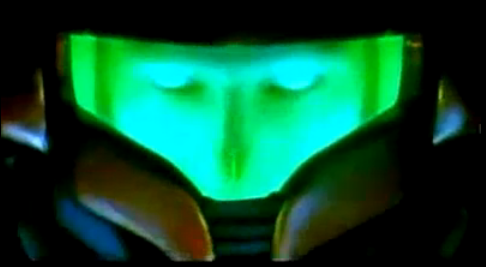
People have criticized Other M for a variety of things: potentially sexist undertones, awkward non-analog controls, Samus’s emotionless voice acting, etc. I, however, either didn’t notice or didn’t mind most of the commonly cited issues when I first played the game. No, there was something else. Something I couldn’t ignore. Something that kept scratching at the back of my mind in the same annoying fashion a house cat lazily paws at its sleeping owner’s face. Something that is never brought up when discussing the game’s flaws. Something that kept running through my moderately attractive head every time I played the game: I’ve seen this before.

To put it bluntly, Metroid: Other M is a rehash of Metroid Fusion.

No seriously, there are just too many similarities. Oddly enough, despite all of the discussion the game has (shine) sparked, no one ever discusses the Goyagma in the room and mentions how suspiciously similar the two games are, even when they’re listing reasons they don’t think the game is good. The only time I’ve seen it brought up was a forum post made shortly after the game was released, and that was quickly dismissed by the site’s other members. So let’s switch to our scan visors and take a closer look.

The Setting

Both games are set shortly after the masterpiece that is Super Metroid. The similarities between settings are more than chronological, however.

In Fusion, the game starts with our girl Sammy escorting a team of xeno-biologists on a mission to survey the metroid home-world, SR-388. After mercilessly blasting a hornoad that could’ve made for a valuable specimen, the creature reveals itself to be an X-parasite in disguise. Samus is infected, hospitalized, and eventually saved by a vaccine made from a DNA sample from the now dead last metroid. Deciding not to question the medical team’s severe misuse of the term vaccine, Samus immediately gets back to work and heads out on her next mission: to investigate a distress signal coming from the BSL (Biological Space Laboratories) Research Station.

The BSL Research Station is a space station-based research facility designed with the study of alien lifeforms in mind. It is equipped with top-of-the-line containment facilities that recreate the environments of the creatures that live in them. Each of these areas are referred to as sectors, are numbered one through six, and recreate a different biome (SR-388, jungle, desert/volcanic, aquatic, ice, and nocturnal).

Ah, the memories: like that one time I got stuck on the spider boss for 16 months.
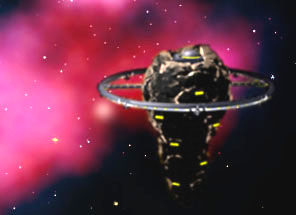
The B.S.L. Research Station serves as the setting of Metroid Fusion.

Other M opens with Samus in a Federation quarantine bay being attended to by Federation medics after her harrowing escape at the end of Super Metroid. After a dry internal monologue and debriefing, Samus is off on her own to…I don’t know, hunt bounties? Anyway, she picks up a “baby’s cry” distress signal and—being the mercenary bounty-hunter that she is—goes to assist with no promise of financial compensation what-so-ever.

Upon arriving at the source of the transmission, Samus finds herself at the Bottle Ship. The Bottle Ship is a space station-based research facility designed with the study of alien lifeforms in mind. It is equipped with top-of-the-line containment facilities that recreate the environments of the creatures that live in them. Each of these areas are referred to as sectors, are numbered one through three, and recreate a different biome (jungle, volcanic, and ice). Sound familiar?

♪ One of these things is just like the other! ♫
The Bottle Ship serves as the setting of Metroid Fus–OTHER M! I was going to say Other M!

[They are] equipped with top-of-the-line containment facilities that recreate the environments of the creatures that live in them. Each of these areas are referred to as sectors, are numbered […], and recreate a different biome.

To top it all off, even the chamber from which the sectors are accessed are the same: a large room situated below the crew quarters and command center with color coordinated elevators.

The Antagonists

Both games also have similar antagonists. Anyone who’s played Fusion can tell you about the paranoia inducing terror that is SA-X. Heck, I still sometimes have nightmares about it. For readers who don’t know, SA-X is the X-Parasite’s mimicry of Samus: it has all of her powers, her knowledge, and—most of all—her suit. Throughout the game, it wanders the BSL, constantly attempting to sabotage Samus’s mission. It destroys machinery, doorways, it even tries to induce a meltdown in the station’s reactor. While the being makes a few onscreen appearances, it usually sticks to the shadows. Throughout the game, SA-X is a threat that seems to be around every corner, just out of sight.

Oh BTW, there are actually TEN of these.
Metroid Fusion is rated E? Man, when is Nintendo going to stop making kid’s games?!

Other M has a similar enemy: the Deleter. The Deleter is a mysterious entity that operates in the shadows. He/she/it constantly attempts to thwart Samus and her allies’ efforts to get to the bottom of what went down on the Bottle Ship by sabotaging equipment, jamming communications, and even systematically eliminating Adam Malkovich’s soldiers one-by-one. Trying to identify and stop the Deleter is one of the major plot elements of the game, much like stopping SA-X is in Fusion.

You never find out.
Surely, uncovering this criminal mastermind’s true identity will be the ultimate payoff!

But Other M doesn’t just have similar antagonists to Fusion, it even goes so far as to copy one of Fusion‘s most iconic bosses: Nightmare. Nightmare is a large, gravity-warping bio-weapon that gave Samus the gravity suit in Fusion. Its battle is one of the longest and most difficult in the game, and as to be expected the fight occurs near the end of the game. The boss returns in Other M, and just like in Fusion is fought near the end of the game. The only real difference is that Fusion bothers to build it up as a major threat, while Other M just shoe horns it into the game.

And then there’s Ridley…who’s in almost every game, so he isn’t worth mentioning. Moving on!

Adam Malkovich

Yet another of the similarities between Fusion and Other M is Adam and his role. In Fusion, Samus’s new ship comes with an on board A.I. that she nicknames Adam after a former commanding officer. Adam is Samus’s guide throughout the game, offering objectives and providing suit upgrades. Adam is eventually revealed to be an uploaded personality and is—in fact—the real (artificially simulated) Adam Malkovich. The real (not artificially-simulated) Adam appears in Other M. In that game he points out objectives to Samus and authorizes use of her various suit features, similar to in Fusion.

The two games also both depict him as potentially untrustworthy. Fusion shows that Adam, and the Federation at large, have a hidden agenda that they’re keeping a secret from Samus. This can also be said of Other M, though it is more ambiguously framed. Adam clearly knows more about the situation at hand than Samus, which is a major source of tension in the game’s story. Other M even goes so far as to depict Adam as a candidate for the true identity of the Deleter. All of this conspiracy mumbo-jumbo leads to my final point…

Surprise! It’s Full of Metroids!

Both game’s have a secret, hidden sector. It’s full of metroids. The Federation is cloning them. They want to use them as bio-weapons. The secret part of the space station is jettisoned into space. Samus fights an adult metroid.

I always imagined SA-X was freaking out a bit at this point.
Imagine this in 3D and then replace SA-X with Adam and you basically have what happens in Other M.

Despite what my very critical overview may suggest, I rather enjoyed Metroid: Other M. It certainly had a number of problems, but the end product still had tight controls, good gameplay, and great production values; overall an enjoyable experience. Unfortunately, as a prequel to Fusion, it’s an abysmal mess that introduces many, many plot-holes. I’d go so far to say it serves as a cautionary tale of how not to do a prequel. All of the similarities make Samus’s reaction to the events of Fusion completely unbelievable. She acts like it’s her first time stumbling across a secret metroid cloning project, or dealing with an enigmatic saboteur, or fighting Nightmare! It’s almost as if Other M was an attempt to rewrite Fusion in hopes of removing the latter from the series continuity like a lab full of metroids from a space-station. But I’ll admit, that’s a bit of a stretch. It’s not like the Big N is some sort of large, secretive collective that would conspire to do something like repeatedly clone Metroids to further their own ends, right?


Haven’t gotten enough Metroid: Other M? Click here to hear Scott and Simeon’s thoughts on the game.


About the author:

Glen is a lifelong Nintendo fan whose first foray into the Metroid Franchise was Metroid Fusion. His love of video games has inspired him to pursue a career in computer programming and is currently studying to get a masters in computer science. And yes, he really does sometimes have nightmares about SA-X.